
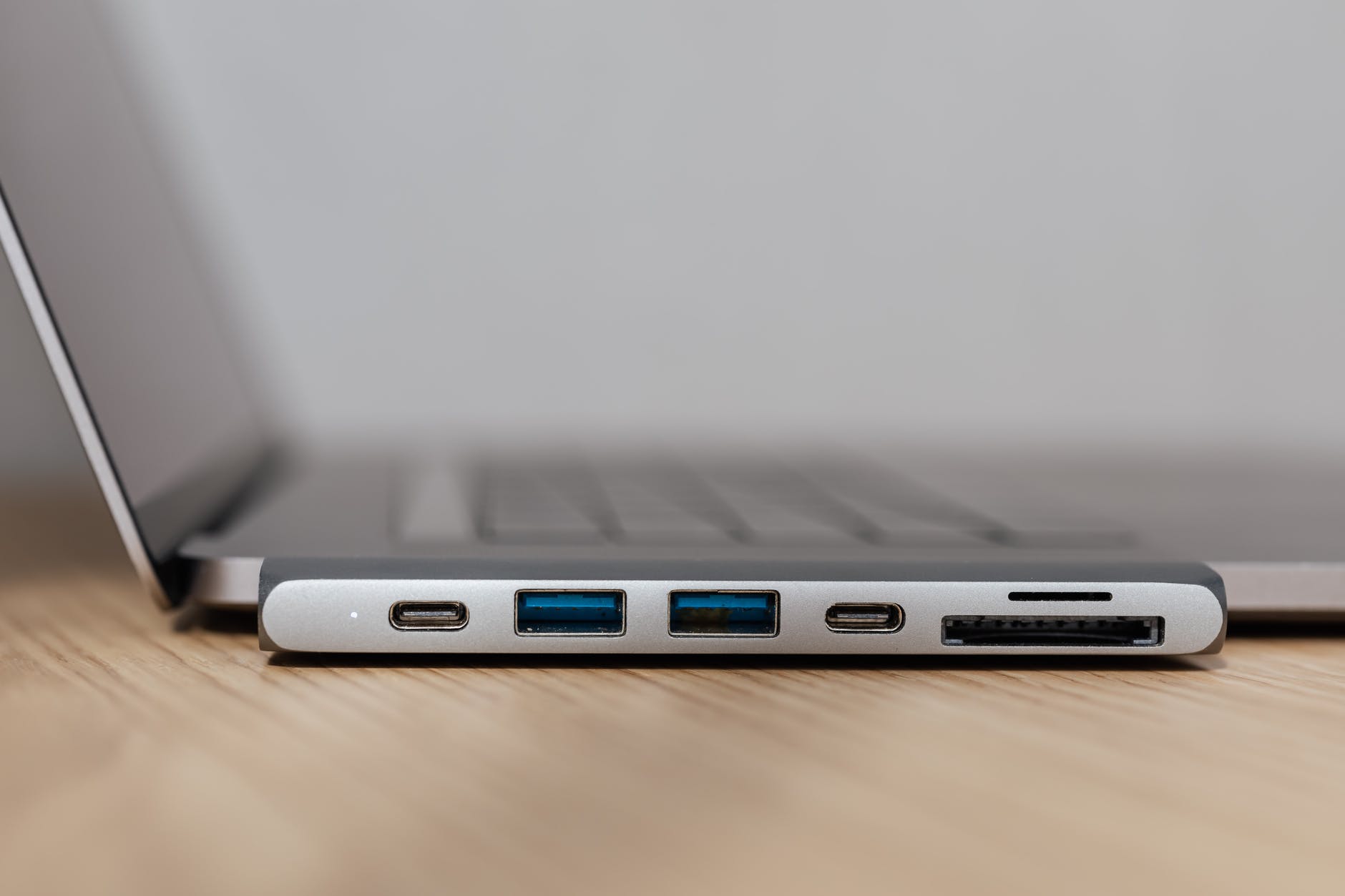
A computer connection is a physical contact point (interface) that allows a computer and component to transfer data.
Analog signals move information in a continuous oscillating wave like a sine wave. Digital signals are binary and are either a one or a zero. The male end of a connection is the plug and the female end is the port or jack. Connections take many forms such as copper, optical and wireless. They can be internal or external in relation to the computer case. Some of the things you have to think about when using connections are distance limitations, signal quality, transfer speeds, frequencies, and DRM. Most connections are either parallel or serial. Serial connections send data bits one after another while parallel connections send multiple bits of data simultaneously over multiple channels of that connection.
SATA is a connection type that is primarily used for connecting storage devices internally to the motherboard. SATA stands for serial ATA or serial advanced technology attachment. A SATA connector has 7 pins and also has a L shaped key. SATA has had many revisions since it first came out in 2000. SATA I was the first revision. It has signaling speeds of 1.5GB/s and transfer rates of 150 MBps. SATA II is the second revision. It has a signaling speed of 3GB/s and transfer rates of 300 MBps. SATA III is the third revision. It has a signaling speed of 6GB/s and transfer speeds of 600 MBps. eSATA is an external SATA connection. eSATA allows SATA devices to be plugged in externally without having to be converted to a different standard which slows transfer rates down. eSATA has a 3GB/s signaling speed and transfer rates of 30 MBps. It is also important to note that each new revision is compatible with previous revisions. All SATA connections allow for a full duplex connection meaning that it can send and receive information simultaneously. PATA is the predecessor to SATA and the best data transfer rates is 133 MBps. PATA is a parallel ATA and only supported half duplex connections which means that it could only send data in one direction at one time.

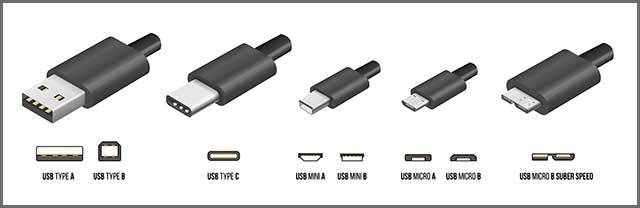
USB stands for Universal Serial Bus. The USB standard can deliver power at 5 volts. USB allows to daisy chain up to 127 devices. USB 1.1 was the first widely adapted standard. It supports speeds of 12 Mbps with full speed cables and 1.5 Mbps with low speed cables. The full speed cables have a maximum length of 5 meters and low speed cables support a maximum length of 3 meters. USB 2 allows speeds to reach 480 Mbps. It has a maximum cable length of 5 meters. USB 3.0 , sometimes called super speed USB, changed how USB was viewed. Before USB 3.0, USB was half duplex. USB 3.0 is full duplex. It has a maximum transfer speed of 5 Gbps and a max cable length of 1 meter or 3 meters depending on the type of cable. USB 3.1, sometimes referred to as super speed+ USB, increases that data transfer rate to 10 Gbps. USB 3.2, also called super speed++ USB, again increases that data transfer rate to 20 Gbps. USB also has different connector form factors, type A, type B, and type C. Type A and B also have different variations; the mini and micro for each type. Type C only has one form. Type C can also support audio, video, and a network connection all at the same time depending on the alternate modes that are supported. The USB standard is backwards compatible with older versions.
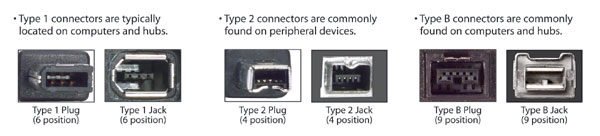
FireWire, or IEEE 1394 as it is formally known, was actually developed before USB. There are two versions. FireWire400 which supported transfer speeds up to 400 Mbps, had two styles of connectors; the 4 pin that was non-powered and the 6 pin that was powered. FireWire800 supported transfer speeds up to 800 Mbps. FireWire800 has a 9 pin connection that is powered. Because of the connector types, the two versions are not forward or backward compatible. The IEEE 1394 standard can only be used at half duplex. FireWire can support up to 63 devices daisy chained together. The powered connections deliver 12 volts of power. FireWire also allows larger packets of a file to be sent at once.
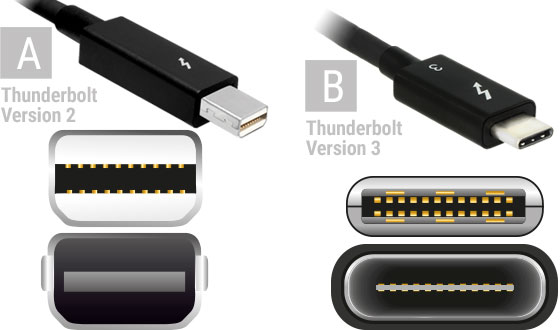
Thunderbolt is a very fast standard that can go over copper connections or optical connections. It is primarily used to connect peripheral devices to a computer. All versions of this standard are full duplex and have a cable length standard of 60 meters over optical and 3 meters over copper. Thunderbolt supports daisy chaining up to 6 devices. The Thunderbolt standard also delivers 18 volts of power. Thunderbolt 1 was the first standard and it could reach transfer speeds of up to 10 Gbps per channel with 2 channels. Thunderbolt 2 doubled those speeds at 20 Gbps per channel with 2 channels. Thunderbolt 3 doubled those speeds again at 40 Gbps per channel with 2 channels. Thunderbolt 1 and 2 use a Mini DisplayPort connector type but are not compatible with the DisplayPort standard. These two standards use different signaling for audio and video. Thunderbolt 3 uses a USB type C connector. Usually you will find a lightning bolt on the cable or by the port to signify that it is a lightning cable or port.

 Chris' Tech Blog